
To launch a liquidity incentive campaign, you get your organization approved, choose what you pay with and what you pay for, set the rate or budget, decide who can earn, fund the campaign, then monitor it while LPs claim. On Turtle Streams the whole flow runs from the Client Portal, and a stream goes live in minutes once the groundwork is in place (Streams docs).
This guide covers each step in launch order and the budget maths as a cost per $1k of TVL per day.
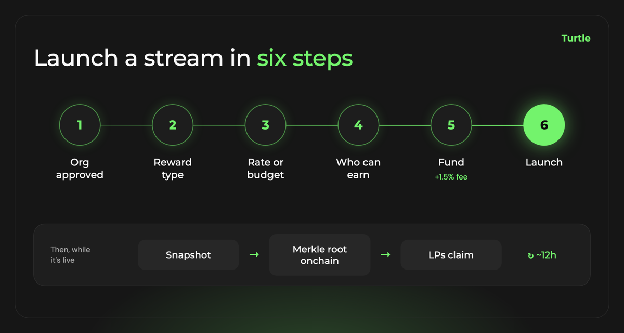
The six launch steps on Turtle Streams, and the claim cycle that runs while a stream is live.
What do you need before you launch?
Five things must be in place first. Point streams skip the funding items.
- An approved organization. Your org must be set up and approved in the Client Portal. That includes signing a master services agreement (MSA). The Turtle team approves new organizations before they get dashboard and API access, and may ask for a know-your-business (KYB) check as part of that review (Client Portal docs).
- The streams-create permission. Stream creation is gated by a permission on your org. If you do not see stream creation in the portal, ask the Turtle team to turn it on.
- A funded wallet on the right chain (token streams only). The creating wallet must already hold the full reward amount plus the creation fee.
- An allowlisted reward token. Check that your token is allowed on your chain before you plan the launch around it.
- A supported chain. Token-stream creation runs on Ethereum, Base, Avalanche and BSC, with Sepolia for testing. The token whose balance you track can sit on a broader set of chains.

Approval can take time, especially when a KYB check is requested, so start it early, while you are still designing the campaign.
What should you pay with, and what should you pay for?
Every stream starts with two choices, made in this order (Choosing a reward model).
The first is the reward base. A stream pays in one reward base: an ERC-20 token or points. Token streams settle onchain and LPs claim them. Points are units of a points program that can convert to tokens at a future TGE (token generation event), which makes them the option when your token does not exist yet.
The second is the reward type, which is what you pay for:
| Reward type | What it pays for | Fits when |
|---|---|---|
| TVL-Based | Value held. Holders earn continuously against their balance | You want to grow or hold TVL in a vault or pool |
| Deposit-Based | How long each deposit stays, through duration tiers that pay at cliffs | You want deposits that stay for a set period |
| Airdrop | A one-time list of recipients and amounts you upload | You are rewarding past activity or running a one-off payout |
| Points (reward base) | Any of Fixed Rate, Daily Budget or Airdrop, paid in points | You are pre-TGE or want to track contribution before committing tokens |
For retention, look at Deposit-Based. Each deposit runs its own clock, and withdrawing before a cliff forfeits that tier's unvested rewards. The Streams guide to choosing a reward model explains how to set tiers.
How do you set the rate or budget?
The mechanic decides how your spend turns into a reward rate. TVL-Based streams offer three standard mechanics and two gap-fill ones.
| Mechanic | The one number you set | What moves when TVL moves |
|---|---|---|
| Fixed Rate | Reward tokens per $1k of TVL per day | Your total spend. Each LP's rate stays the same |
| Daily Budget | Tokens per day, split pro-rata | The rate each LP earns. Your spend stays flat |
| Fixed APR | An annual rate on top of the native yield | Your spend, converted to tokens at each snapshot using current prices |
| Target APR | A floor for total yield | Your spend. You pay only the gap between the vault's native yield and the target |
| Reference APR | Another vault's rate, plus an optional offset | Your spend. You pay only the shortfall against that vault |
Pick by what you need to keep fixed. A predictable cost per dollar of liquidity points to Fixed Rate. A fixed daily spend points to Daily Budget, with a rate that falls as TVL grows.
Target APR suits a vault whose native yield moves. The gap is measured against a trailing average (7 days, 1 month, 3 months or 6 months), and the stream pays nothing when the vault already meets the target. It does not guarantee any depositor's return.
Point streams support only Fixed Rate, Daily Budget and Airdrop. Gap-fill settings lock at creation.
How much should a liquidity incentive campaign cost?
Size the budget as a cost per $1k of TVL per day. It is the unit Fixed Rate uses, and the Streams overview shows it for every live stream, so you can compare campaigns of different sizes on one number.
The conversion to an annual figure is: cost per $1k per day × 365 / 1,000 = annualized cost per dollar of TVL, which reads as an implied reward APR.
The example below is illustrative only. It assumes a reward token priced at $1 for simplicity:
| Input | Value (illustrative) |
|---|---|
| Rate | $0.25 per $1k of TVL per day |
| Annualized | 0.25 × 365 / 1,000 = 0.091, about a 9.1% implied reward APR |
| Expected TVL | $10M, so 10,000 units of $1k |
| Daily spend | 10,000 × $0.25 = $2,500 |
| Duration | 60 days |
| Reward budget | $2,500 × 60 = $150,000 |
| Creation fee (1.5% of the funded reward amount) | $2,250 |
| Wallet must hold before launch | $152,250 in the reward token |
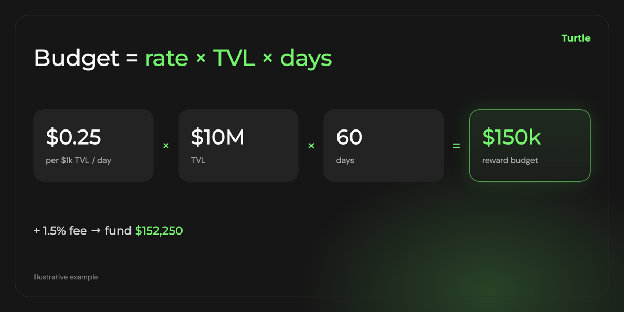
Illustrative budget for a 60-day Fixed Rate stream, sized as a cost per $1k of TVL per day.
The creation fee is charged in the reward token on top of the funded amount. Turtle Pro organizations pay a one-time $10,000 fee, then 0% on every stream, which breaks even with the 1.5% rate at about $666,667 distributed. Point streams pay no fee (Before you start).
Streams must distribute at least $33.33 per day, so the longest a stream can run is the budget divided by that floor. With Fixed Rate, spend grows if TVL overshoots your estimate; an optional Daily Cap or Max Budget bounds it.
To judge whether your number is high or low, compare it with what past programs paid for the TVL they kept. Our cost-per-TVL benchmarks collect those figures by campaign type.
Who should be eligible to earn?
Eligibility decides whether your budget pays the LPs you want. Set it on the final review screen (Create a stream).
- Deposit route. All Deposits, Turtle Only (deposits through the Turtle app or any Turtle distributor), or Select Distributors (only deposits routed through distributors you choose).
- Minimums. A minimum deposit or minimum TVL per stream, set in tokens.
- Whitelist. Restrict earning to tagged wallets or a CSV list.
- Blacklist. Wallets flagged as OFAC-sanctioned by the Chainalysis Sanctions Oracle are excluded by default. Add tags or a CSV list to exclude more, such as your treasury. Exclusion wins over the whitelist.
- Bonuses. Percentage boosts for a linked X or Telegram account, referrals, or holders of an asset you choose.
- Reward forwarding. Pass rewards earned by a vault contract through to the vault's underlying LPs.
How do you fund and launch the stream?
Funding and launching are one action. On the review screen, select Fund Stream, approve the reward token spend, then sign the createStream transaction. The Turtle backend issues a signature and your wallet submits the transaction to the StreamFactory contract.
Each stream gets its own non-custodial contract, fully funded at creation; the contracts were audited in January 2026 (Streams overview).
Check everything before you sign. A stream's total amount and duration cannot be increased after launch. If you need the campaign to run longer, plan a follow-on stream.
A Safe multisig creates the stream through the API and the Safe Transaction Builder. Point streams skip all of this and are created instantly.
What should you monitor after launch?
Rewards accrue from creation. The first snapshot lands within about 12 hours, then balances update roughly twice a day (Managing a stream).
The Streams overview shows each stream's incentive APR, cost per $1k of TVL per day, distributed and remaining balance, projected spend and a health score. The Distribution Dashboard adds participants and accrued rewards.
Three controls remain once a stream is live:
- Pause halts accrual for the paused window. Rewards already committed stay claimable.
- End early stops accrual immediately. LPs keep what they earned.
- Recover unclaimed funds after the stream ends, for tokens LPs never claimed.
Read the first weeks against your baseline TVL and set the next stream's rate from what you learn.
How do LPs claim their rewards?
LPs claim on their own schedule. Roughly every 12 hours, the latest reward snapshot is committed onchain as a Merkle root, and a wallet presents a Merkle proof to the stream contract to receive its balance (Claiming rewards).
Claims are cumulative: one transaction pays the full outstanding balance. TVL-Based rewards become claimable with each commit; Deposit-Based rewards become claimable at each cliff. An airdrop distributes in about 80 minutes or less.
You choose where the claim happens:
| Claim path | What you build | Fits when |
|---|---|---|
| Through Turtle | Nothing. LPs claim in Portfolio, Earnings on app.turtle.xyz | You want to go live fast |
| Embedded in your front end | A claim button that fetches proofs from the API | You want LPs to stay in your product |
| Delegated (auto-claim) | A service that claims for users after a one-time operator approval | You want gasless claiming for users |
Points have no onchain claim. They accrue offchain and convert at a future TGE.
How does Turtle help you launch a liquidity incentive campaign?
Turtle runs liquidity incentive campaigns through Turtle Streams: token or points rewards for the liquidity you want to keep, paid from a non-custodial contract per stream. Approval, reward model, budget, eligibility and claims sit in one flow, and every live stream shows its cost per $1k of TVL per day, so you can read what each dollar of liquidity costs from the first snapshot.
When you need deposits from outside your own users, Turtle distributors route them to your vault, and the Select Distributors setting pays only for that liquidity. Our cost-per-TVL benchmarks help you set the budget before you launch.
Set up your organization in the Client Portal, and your first stream goes live in minutes once it is approved.
FAQ
What do I need to launch an incentive campaign?
An approved organization with a signed MSA and the streams-create permission. A token stream also needs an allowlisted reward token on Ethereum, Base, Avalanche or BSC, and a wallet holding the budget plus the creation fee. A points campaign needs no funding.
How long does setup take?
Creating the stream takes minutes once the prerequisites are in place. Organization approval, with its MSA and any KYB check, has to clear first, so start it early. The first reward snapshot lands within about 12 hours of launch.
How much should I budget?
Multiply your cost per $1k of TVL per day by the expected TVL in thousands and by the days, then add the 1.5% creation fee for token streams. Check the annualized figure (× 365 / 1,000) against benchmarks first: the budget cannot be increased after launch.
How do LPs claim rewards?
By default on the Turtle app, under Portfolio, Earnings. New balances become claimable each time a Merkle root is committed onchain, roughly every 12 hours. One claim pays everything owed, and rewards stay claimable after the stream ends.
Can I run a campaign before my token launches?
Yes, with a point stream. It is created instantly, with no funding and no creation fee, and points can convert to tokens at a future TGE.